
How I Built A Signup Flow With Email Code Verification
Using serverless services: Lambda, SES, Cognito and DynamoDB

I recently had to build a signup flow for one of my client’s mobile apps.
My client needed a simple system that would perform the following process:
Users register to the app using AWS Cognito
Users are then onboarded to the app
Once onboarded, the system sends the user an email to verify their account
Users could copy the verification code and enter it on a verification screen on the app
Once the code is verified against the user’s email their account is created and verified.
The microservice was made up entirely of AWS services.
Overview
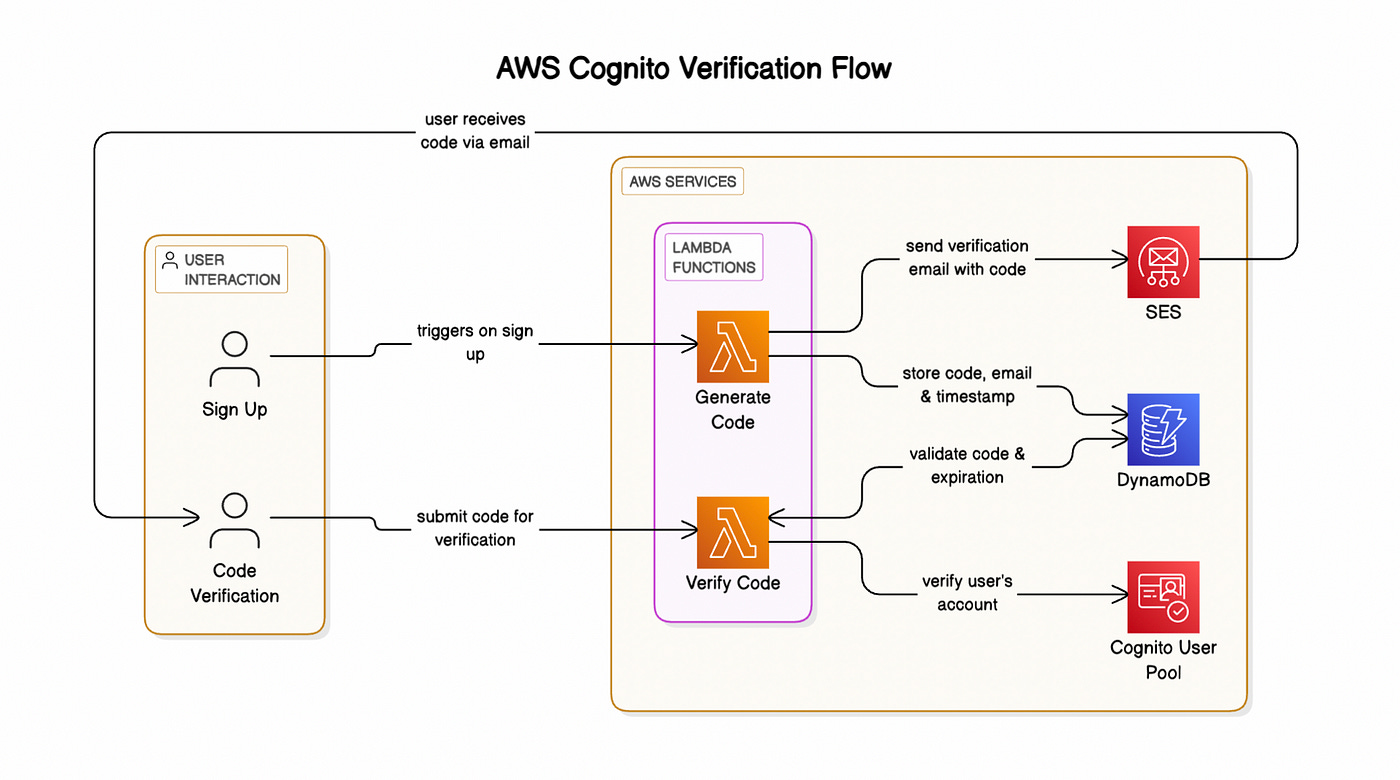
Here’s a general overview of the flow I created to satisfy this feature:
I created an AWS Cognito user pool for user authentication
When users sign up for an account, a Lambda function generates a 6-digit verification code.
The Lambda function sends the user an email using SES, which includes the verification code.
The Lambda function stores the verification code along with the user’s email and a timestamp of the code generation.
The user could then open their email, copy the code and enter it in the code verification screen.
Once submitted, another Lambda function verifies if the code exists in the DynamoDB database and checks if the timestamp hasn’t passed its 15 minute expiration.
If these two checks pass, the Lambda function calls the Cognito API to verify the user’s email and account.
Let’s go through the implementation of each of these processes in detail.
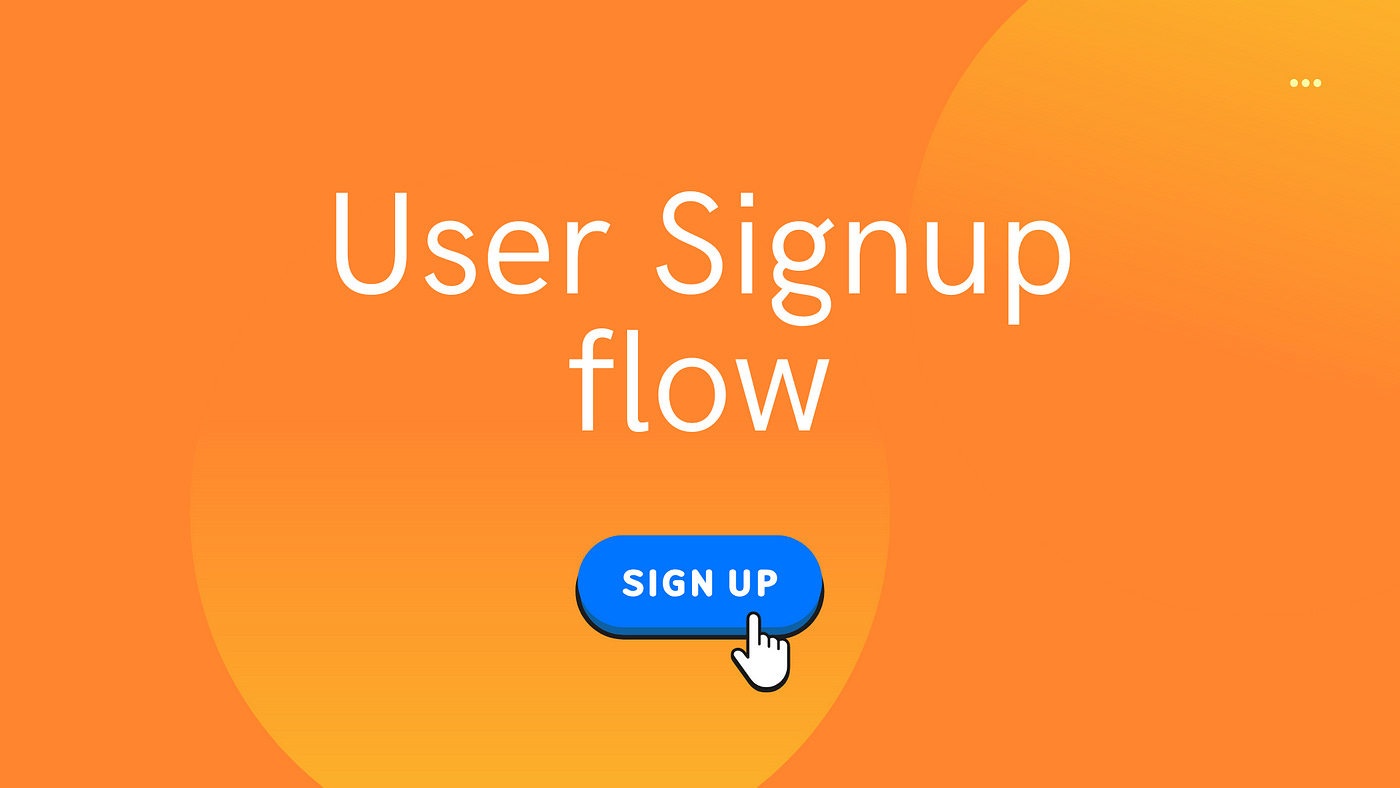
1. Cognito User Pool
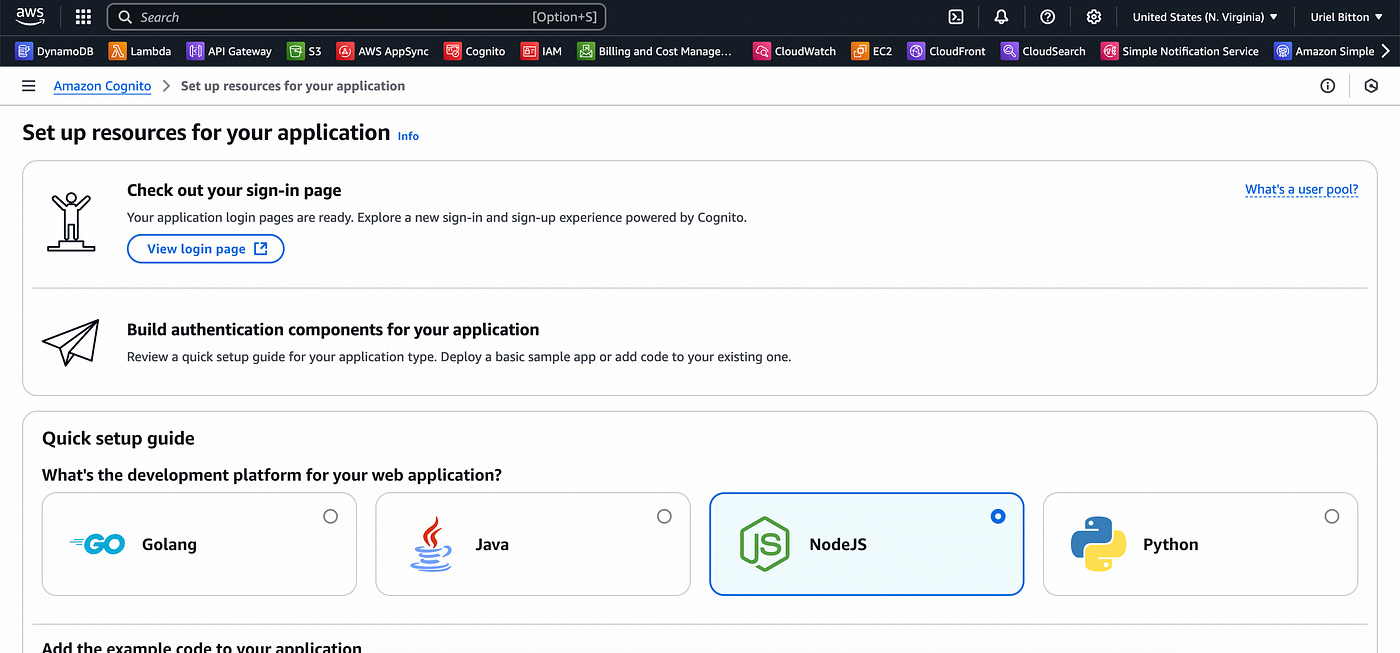
In the AWS console, I created a new user pool.
I chose “Traditional web application” and entered an application name.
Under Configure options I chose email as Options for sign-in identifiers.
Once I clicked on Create user directory, I then have all the code necessary to implement the user auth for my app.
Let’s now look at the Lambda function I wrote to generate the verification code.
Let’s focus on the verification code flow in this article, but if you want to learn more details on how to setup Cognito, I wrote a full article here.
2. Lambda function to generate verification code
Here is the general flow:
I created an endpoint using AWS API Gateway with a route for “user-signups”.
Users can invoke that endpoint which triggers a Lambda function.
The Lambda function accepts an email as a path parameter (event.pathParameter in Lambda).
Next, I used the crypto Node JS library to generate a 6 digit code.
I then write an item to DynamoDB containing the following data:
user’s email
verification code
a timestamp (TTL)
The timestamp I add is an item defined as a TTL so that the item gets automatically deleted by DynamoDB.
Since DynamoDB takes up to 48 hours to delete TTL items, in the second Lambda function that verifies the code (below), I check the item’s ttl timestamp to check if more than 15 minutes have elapsed since the item’s creation and return a verification error if it has expired.
I explain more about TTLs in DynamoDB in this article if you’re interested.
Once the item has been successfully written to the database, I use SES to send an email containing the verification code to the user’s email address.
Here’s the Lambda function code:
import { SESClient, SendEmailCommand } from '@aws-sdk/client-ses';
import { DynamoDBClient, PutItemCommand } from '@aws-sdk/client-dynamodb';
import { randomInt } from 'crypto';
import { marshall } from '@aws-sdk/util-dynamodb'

const ses = new SESClient({});
const dynamoDb = new DynamoDBClient({});
const adminEmail = process.env.adminEmail;

const themeColor = "#316afd"

export const handler = async (event) => {
  const { email } = event.queryStringParameters;

  if (!email) {
    throw new Error("Email address is required.")
  }

  try {

    const code = generateCode();

    const params = {
      TableName: 'my-app',
      Item: marshall({
        pk: `authcode#${email}`,
        sk: email,
        email,
        code,
        ttl: Math.floor(Date.now() / 1000) + 15 * 60,
        timeCreated: Math.floor(Date.now() / 1000)
      })
    };

    await dynamoDb.send(new PutItemCommand(params));

    const emailParams = {
      Source: adminEmail,
      Destination: {
        ToAddresses: [email],
      },
      Message: {
        Subject: {
          Data: 'Your Verification Code',
        },
        Body: {
          Html: {
            Data: `<html>
                    <body>
                      <p>
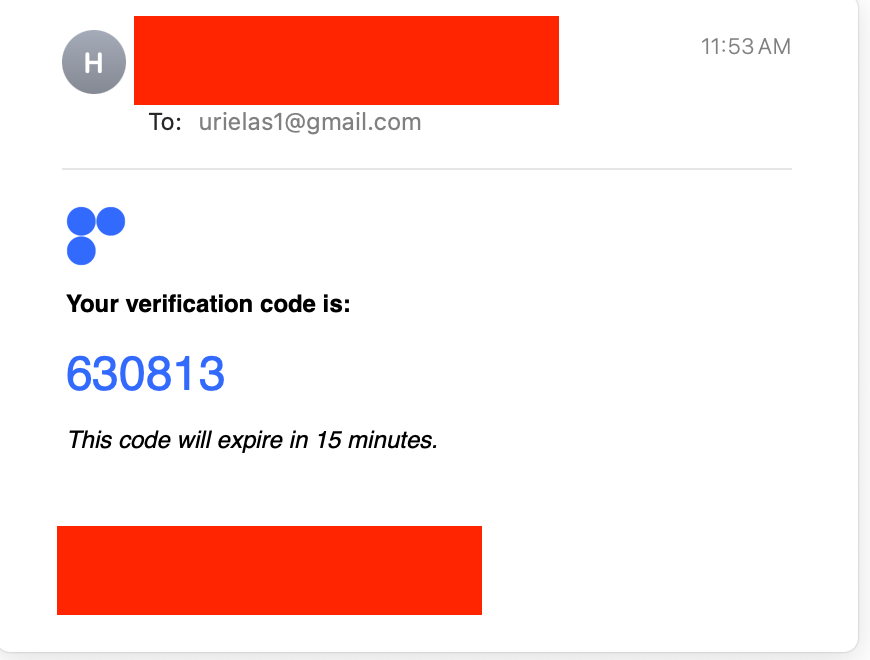
                        <strong>Your verification code is:</strong>
                        <br><br>
                        <span style="font-size: 24px; color: blue;">${code}</span>
                      </p>
                      <p>
                        <em>This code will expire in 15 minutes.</em>
                      </p>
                    </body>
                   </html>`,
          },
        },
      },
    };

    await ses.send(new SendEmailCommand(emailParams));

    return {
      statusCode: 200,
      body: JSON.stringify({ message: 'Code sent successfully' }),
    };
  } catch (error) {
    console.error(error);
    return {
      statusCode: 500,
      body: JSON.stringify({ message: 'Internal server error', error }),
    };
  }
};

function generateCode() {
  return randomInt(100000, 999999).toString();
}
3. Lambda function to verify code
When the user opens their email, they copy the verification code and can submit it back on the app.
When they do, here’s the process I created to verify that code:
When the user calls the verify-code function, they provide their userID, code and email.
I attempt to get the verification code item from DynamoDB, using the user’s email.
If the item exists, I first check if the code on the database matches the provided email.
If it does, I check the current time against the TTL timestamp.
If the time difference is greater than 15 minutes it will return an error.
Finally, if the email provided matches the email on the database, the function will return a success message and verify the user’s email account.
Here’s the full code:
import { DynamoDBClient, GetItemCommand } from '@aws-sdk/client-dynamodb';
import { marshall } from '@aws-sdk/util-dynamodb';

const dynamoDb = new DynamoDBClient({});

export const handler = async (event) => {
  const { email, code, userID } = JSON.parse(event.body);

  if (!email || !code || !userID) {
    return {
      statusCode: 400,
      body: JSON.stringify({ message: 'Required parameters are missing.' }),
    };
  }

  try {
    const params = {
      TableName: 'my-app',
      Key: marshall({
        pk: `authcode#${email}`,
        sk: email
      }),
    };

    const data = await dynamoDb.send(new GetItemCommand(params));

    if (!data.Item) {
      return {
        statusCode: 404,
        body: JSON.stringify({ message: 'No record found for this email.' }),
      };
    }

    const storedCode = data.Item.code.S;
    const currentTime = Math.floor(Date.now() / 1000);
    const storedEmail = data.Item.email.S;
    const timeCreated = data.Item.timeCreated.N;
    const timeHasExpired = currentTime > +timeCreated + 15 * 60;

    if (storedCode !== code) {
      return {
        statusCode: 400,
        body: JSON.stringify({ message: 'Incorrect verification code.' }),
      };
    }

    if (timeHasExpired) {
      return {
        statusCode: 400,
        body: JSON.stringify({ message: 'Verification code has expired.' }),
      };
    }

    if (email !== storedEmail) {
      return {
        statusCode: 400,
        body: JSON.stringify({ message: 'Email addresses do not match.' }),
      };
    }
    return {
      statusCode: 200,
      body: JSON.stringify({ message: 'User verified successfully!' }),
    };
  } catch (error) {
    console.error(error);
    return {
      statusCode: 500,
      body: JSON.stringify({ message: 'Internal server error' }),
    };
  }
};
Here’s an quick demo of invoking the function:
I get an email:
And the item appears in my DynamoDB table:
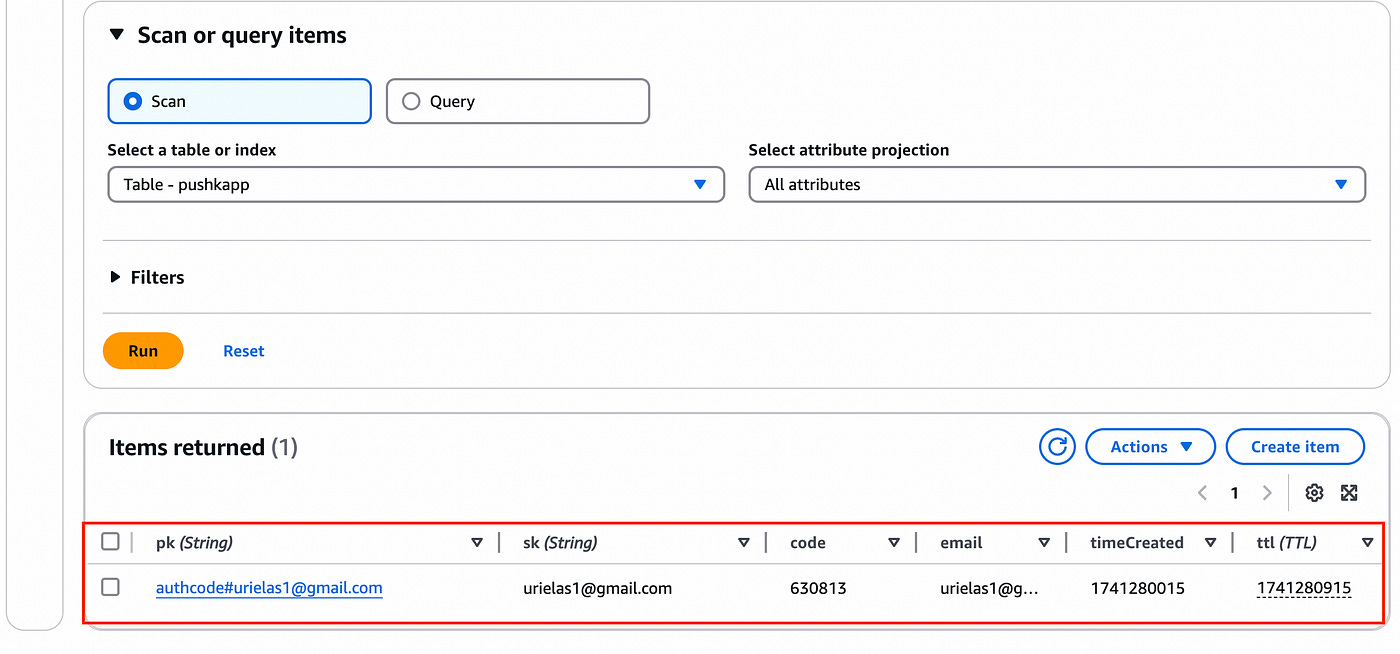
(Of course I deleted this item before publishing the article 😅).
One note on using a TTL and a timeCreated timestamp: I do this because these two attributes serve two different purposes.
The TTL is used to tell DynamoDB to automatically delete the item after it is expired (since I do not need it).
Since the TTL deletion isn’t instantaneous, I also need to verify the timestamp at which the item with the code was created in order to invalidate it if more than 15 minutes have elapsed since its creation.
Summary
Creating a signup verification flow using AWS services is simple and straightforward.
With a little understanding of DynamoDB TTLs and using Amazon SES to send emails, you can create this flow while keeping best practices and optimizing your database’s storage.
👋 My name is Uriel Bitton and I’m committed to helping you master Serverless, Cloud Computing, and AWS.
🚀 If you want to learn how to build serverless, scalable, and resilient applications, you can also follow me on Linkedin for valuable daily posts.
Thanks for reading and see you in the next one!