
Using AWS CloudWatch Contributor Insights To Detect High Traffic DynamoDB Partitions
Monitoring hot partitions is key to optimizing cost and performance in DynamoDB


One of the most common scalability pitfalls in DynamoDB is unintentionally creating hot partitions.
These occur when one or more partition keys receive disproportionately high traffic compared to others, leading to throttled requests and performance bottlenecks.
However, AWS provides a built-in solution to help identify and debug this issue:
CloudWatch Contributor Insights.
Contributor Insights is a powerful tool that lets you analyze high-cardinality data, such as the top request contributors by key.
When configured with DynamoDB, it gives you visibility into the most accessed partition keys, which is critical for detecting uneven requests early before they result in digital traffic jams.
Why Hot Partitions Are a Problem

DynamoDB is a horizontally scalable NoSQL database, meaning it spreads your data across multiple partitions.
Each partition has a fixed capacity for read and write throughput. If a single partition receives more traffic than it can handle, you’ll start seeing throttling errors, even if your overall provisioned throughput is sufficient.
Hot partitions usually occur when you have poor partition key design, where a small subset of keys are hogging all of the traffic.
For instance, using timestamps, user IDs with heavy activity, or status fields like "active" as partition keys can result in uneven data distribution.
CloudWatch Contributor Insights
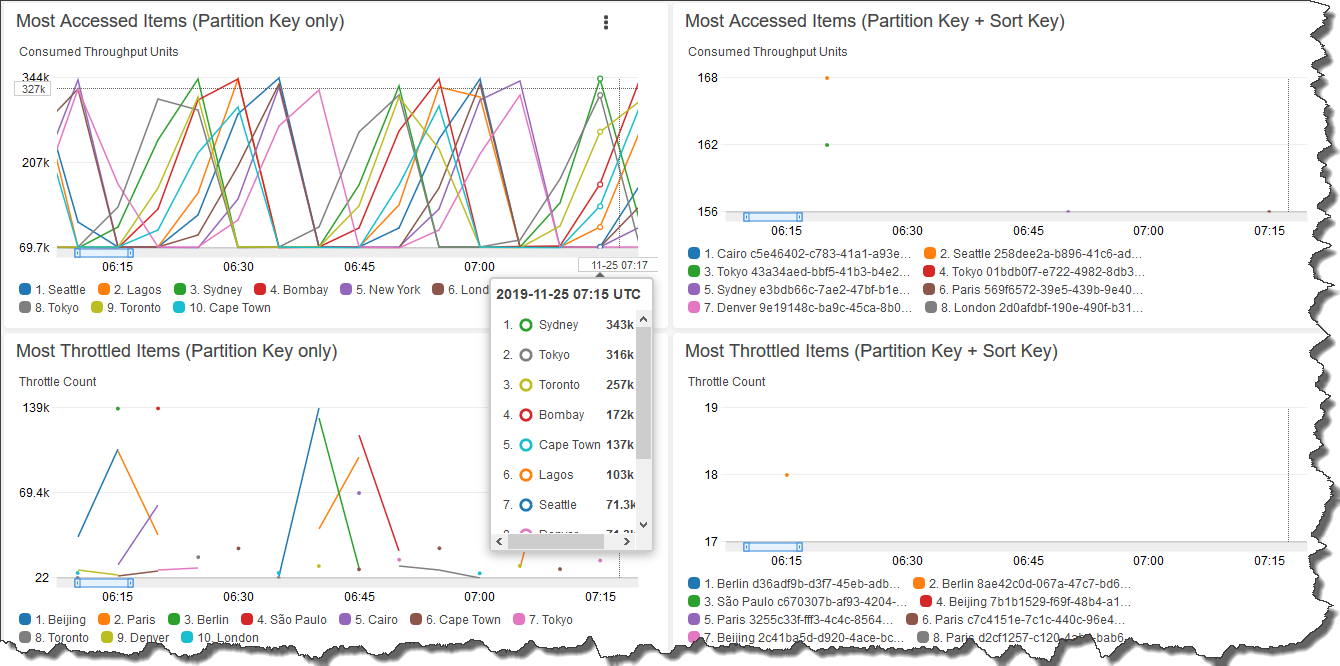
CloudWatch Contributor Insights helps monitor DynamoDB at a granular level by analyzing which partition keys are responsible for the most traffic.
For example, in the image above we can get a visual representation of the most accessed items (by partition and partition + sort keys), and most throttled items (by partition and partition + sort keys).
You can enable it on a table or global secondary index (GSI), and it will track the top contributors to read and write operations, as well as throttling.
How It Works
Contributor Insights automatically collects metrics like:
Top partition keys by read or write count
Top items causing throttling
Time-based trends for those contributors
This data is presented in a time-series format, making it easy to visualize spikes or persistent issues with particular keys.
Once enabled, you can view the insights directly in the AWS CloudWatch console under Contributor Insights. You can also set up alarms to be notified when specific thresholds are breached, like when a single key starts attracting all the traffic.
Setting It Up
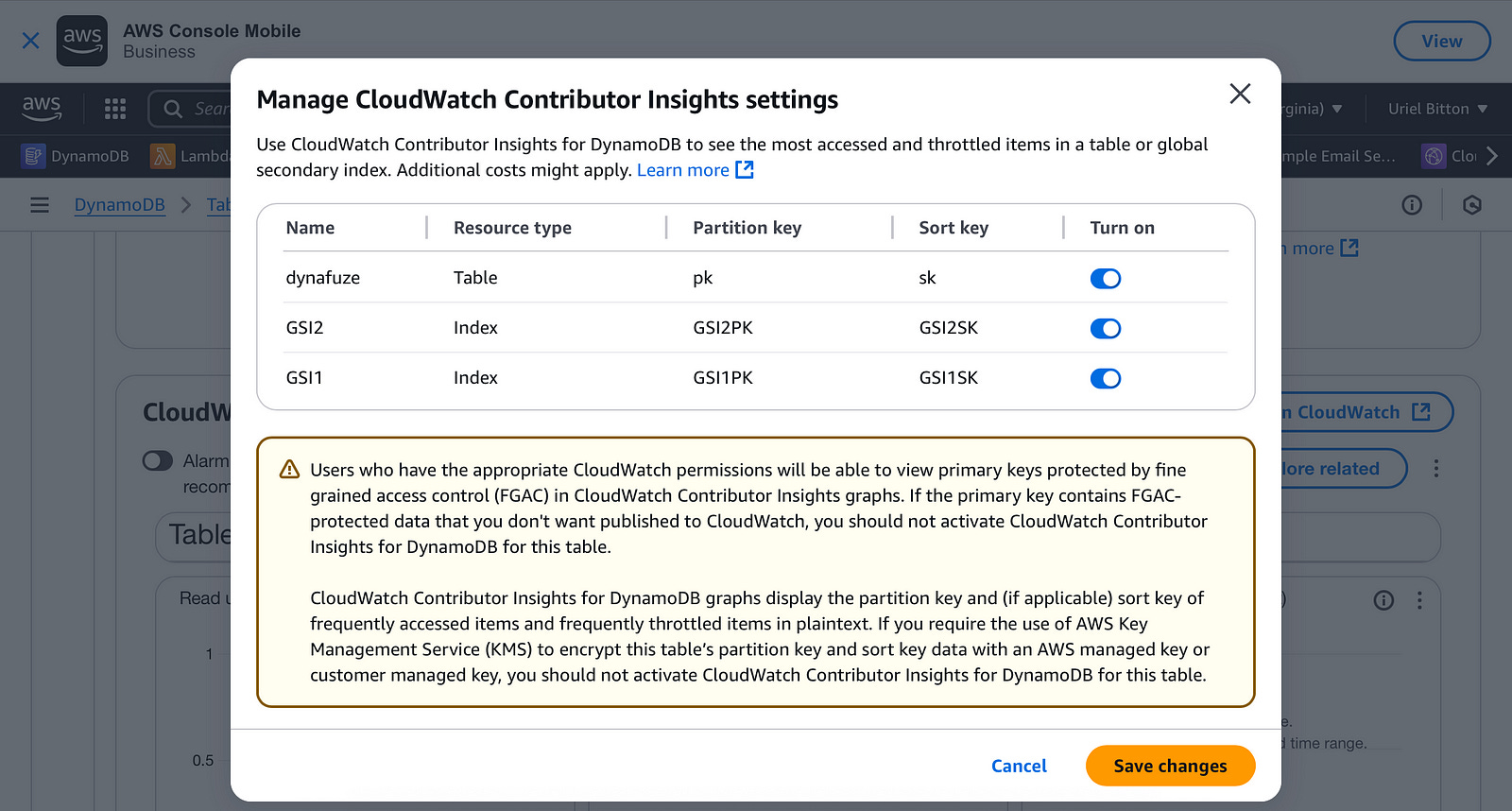
Setting up Contributor Insights for a DynamoDB table is straightforward:
Open the DynamoDB console.
Choose your table.
Go to the Monitoring tab and select Contributor Insights.
Enable rules for reads and writes.
Enable it for the base table or indexes you want.
Once enabled, you’ll start getting visibility into partition-level activity within minutes.
Example Use Case
Imagine you have a social media app where each user’s activity is stored using their user ID as the partition key.
Most users are low-traffic, but your influencer users may have millions of followers and generate thousands of reads and writes per minute.
Contributor Insights will surface these popular user IDs, allowing you to:
Pinpoint which users are generating the most load
Adjust your access patterns (e.g., sharding hot keys with a suffix like a date)
Add caching layers or rethink your data model
Optimizing Based on Insights
Once you identify a hot partition, the next step is remediation.
Common strategies include:
Sharding: Split hot keys into multiple logical keys (e.g., user123#shard1, user123#shard2) to distribute load.
Write Batching: Combine multiple writes into a single operation.
TTL (Time to Live): Reduce data stored on hot keys over time.
Caching: Use services like DynamoDB DAX or ElastiCache to offload reads.
These changes can significantly reduce the chance of throttling and improve user experience.
Conclusion
Hot partitions can silently degrade performance in high-scale applications using DynamoDB.
AWS CloudWatch Contributor Insights provides an elegant and low-effort way to detect these patterns early.
By enabling it, you can gain real-time awareness of access patterns and can optimize your data model before performance issues affect your users.