
Using DynamoDB’s Import From S3 Tool To Drastically Reduce Migration Costs
The cheapest method to migrate your data to Amazon DynamoDB

Before the native Import From S3 feature, loading large amounts of data into DynamoDB was complex and costly.
It typically required complex ETL pipelines, custom loaders and large scale resources like EMR clusters.
With DynamoDB’s (relatively) new S3 import tool, loading these large amounts of data into your tables is dramatically simplified.
You can import terrabytes of data into DynamoDB without writing any code or provisioning servers. It supports, CSV, DynamoDB JSON, and ION formats.
What’s more is that it doesn’t consume your table’s write capacity.
In this article, I’ll guide you through a demo of using this tool and break down how it can drastically reduce your data migration costs.
Import From S3 Tool Demo
In the AWS console, head into the DynamoDB service and select an existing table.
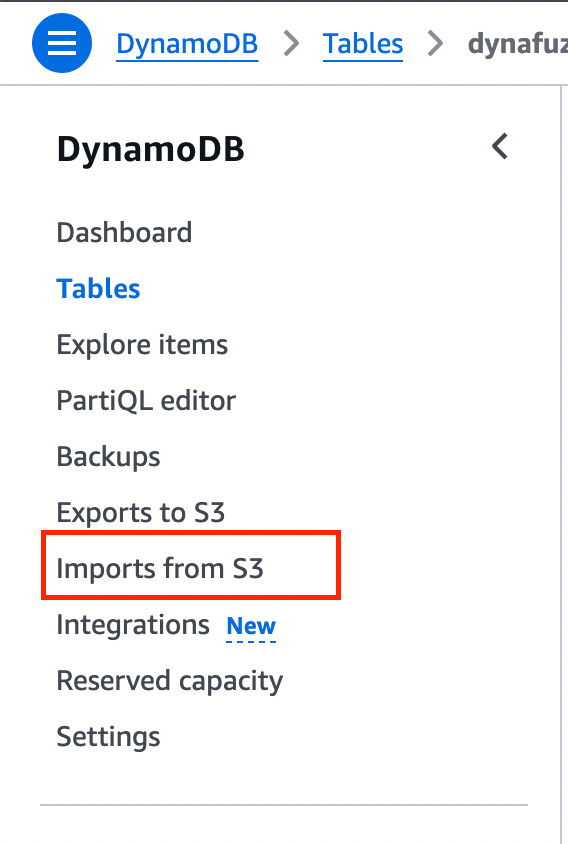
On the left hand sidebar, click on Imports from S3.
Here you will see a page for import options.
You need to provide your S3 bucket URL, select an AWS account, choose a compression type and also choose an import file format.
If you want to import a csv file, you can choose CSV, otherwise choose the DynamoDB JSON format.
We’ll assume you have existing DynamoDB JSON data in a S3 bucket already. It should look like this:
{
  "name": {
    "S": "John Doe"
  },
  "age": {
    "N": "20"
  }
}
Click next, you will see the following page next:
Select the DynamoDB table you will import this data into, as well as define the partition and sort keys for this table.
Click the next button.
On the following page, you can configure the throughput settings for this table (although it’s optional).
When you click next, you can review the import settings you made and click on import to start the import job.
Once the import job is running, you will see a new item has been added to the “imports from S3” page:
It might take a while, depending on the size of the JSON file. Once it’s done, you should have the data written to your new DynamoDB table.
Cost Considerations
If you’re looking to import large datasets into DynamoDB, the Import from S3 feature offers a major cost advantage.
At just $0.15 per GB, it is dramatically cheaper than DynamoDB’s (WCU) write costs, saving approximately 90% compared to on-demand writes.
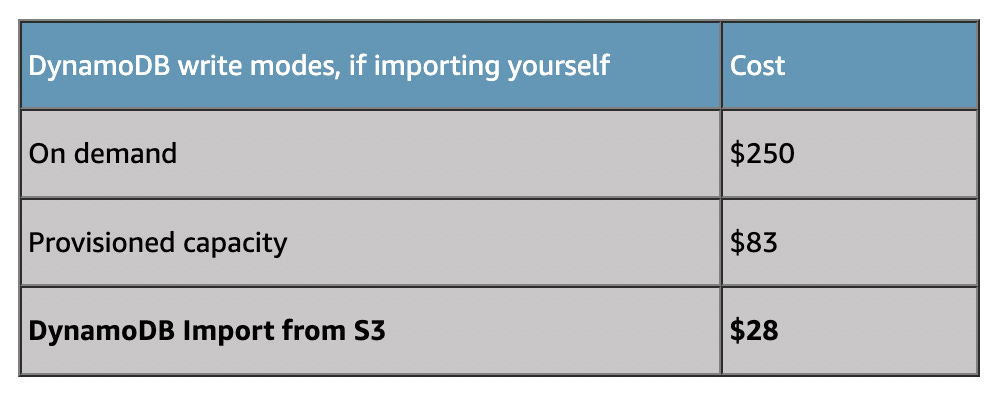
Below is an example use case taken on 100 million items loaded into a DynamoDB table.
In this scenario, importing 100 million items (~380 GB total table size), on-demand writes would cost around $250, while S3 import would only cost $28.
Even compared to provisioned capacity, it almost three times cheaper:
👋 My name is Uriel Bitton and I’m committed to helping you master Serverless, Cloud Computing, and AWS.
🚀 If you want to learn how to build serverless, scalable, and resilient applications, you can also follow me on Linkedin for valuable daily posts.
Thanks for reading and see you in the next one!